vitepress
1. 初始化
1.1 初始化工程
shell
npm init -y1.2 添加依赖
shell
npm i vitepress sass -D1.3 添加运行脚本
json
{
  "name": "vitepress",
  "version": "1.0.0",
  "description": "gn",
  "main": "index.js",
  "keywords": [],
  "author": "",
  "license": "ISC",
  "dependencies": {
    "vitepress": "^1.0.0-alpha.32"
  },
  "devDependencies": {
    "sass": "^1.57.0"
  },
  "scripts": {
    "dev": "vitepress dev docs",
    "build": "vitepress build docs",
    "serve": "vitepress serve docs"
  },
  "directories": {
    "doc": "docs"
  }
}
1.4 创建首页
在工程目录下创建docs目录,并添加index.md文件。此时已完成vitepress工程的初始化。
md
---
layout: home
hero:
  name: SFMap
  text: 文档中心
  tagline: 文档中心
  image:
    src: image.png
    alt: image
  actions:
    - theme: brand
      text: 进入学习
      link: /learn/
features:
- icon: leaflet
  title: leaflet
  details: Leaflet is designed with simplicity, performance and usability in mind. It works efficiently across all major desktop and mobile platforms.

- icon: openlayers
  title: openlayers
  details: OpenLayers makes it easy to put a dynamic map in any web page. It can display map tiles, vector data and markers loaded from any source.

- icon: mapboxGL
  title: mapboxGL
  details: Mapbox GL JS is a client-side JavaScript library for building web maps and web applications with Mapbox's modern mapping technology.
---
1.5 添加页面
在/docs路径下添加/learn/index.md文件。
1.6 添加配置文件
在/docs目录下创建/docs/.vitepress/config.js文件,文件内容如下:
js
module.exports = {
    title: 'SfMap',
    description: 'SfMap文档中心',
    lang: 'zh-CN',
    // github pages 配置
    base: '/',
    head: [
        // 添加图标
        ['link', { rel: 'icon', href: '/logo.png' }]
    ],
    themeConfig: {
        // 网站 logo
        logo: '/logo.png',
        // 网站标题
        siteTitle: 'SfMap文档中心',
        // 启动页面丝滑滚动
        smoothScroll: true,
        // 社交账户链接
        socialLinks: [
            {
                icon: {
                    svg: '<svg t="1671270414569" class="icon" viewBox="0 0 1024 1024" version="1.1" xmlns="http://www.w3.org/2000/svg" p-id="2135" width="64" height="64"><path d="M512 0c282.784 0 512 229.216 512 512s-229.216 512-512 512S0 794.784 0 512 229.216 0 512 0z m189.952 752l11.2-108.224c-31.904 9.536-100.928 16.128-147.712 16.128-134.464 0-205.728-47.296-195.328-146.304 11.584-110.688 113.152-145.696 232.64-145.696 54.784 0 122.432 8.8 151.296 18.336L768 272.704C724.544 262.24 678.272 256 599.584 256c-203.2 0-388.704 94.88-406.4 263.488C178.336 660.96 303.584 768 535.616 768c80.672 0 138.464-6.432 166.336-16z" fill="#CE000D" p-id="2136"></path></svg>'
                },
                link: 'https://blog.csdn.net/GISShiXiSheng'
            }
        ],
        // 导航栏配置
        nav: [
            {
                text: '学习',
                link: '/learn/'
            },
            {
                text: '友情链接',
                items: [
                    { text: 'CSDN', link: 'https://blog.csdn.net/GISShiXiSheng' }
                ]
            }
        ],

        // 左侧边栏配置
        sidebar: {
            '/learn/': [
                {
                    text: '学习资源',
                    collapsible: true,
                    items: [
                        {text: '概述', link: '/learn/'},
                        {text: 'html', link: '/learn/html'},
                        {text: 'css', link: '/learn/css'},
                    ]
                }
            ],
        },

        // 右侧边栏标题
        outline: 'deep', // [2, 5]
        outlineTitle: '章节导航',

        // 上下篇文本提示文字
        docFooter: {
            prev: '←上一篇',
            next: '下一篇→'
        },

        // 上次更新时间提示文字
        lastUpdatedText: '上次更新时间',

        // 编辑链接
        // editLink: {
        //     text: '我的博客',
        //     pattern: 'https://www.csdn.net/'
        // },

        // 页面底部
        footer: {
            message: '',
            copyright: 'Copyright © 2023 SFMAP'
        }
    }
}
1.7 自定义vue组件
在/docs目录下创建/docs/components/目录,vue组件可放在此目录。引用可通过setup方式,如下:
<iframe-box src="/pages/mapbox/base-initmap.html"></iframe-box>1.8 添加静态资源
在/docs目录下创建/docs/public目录,所有的静态资源都放在该目录下面。
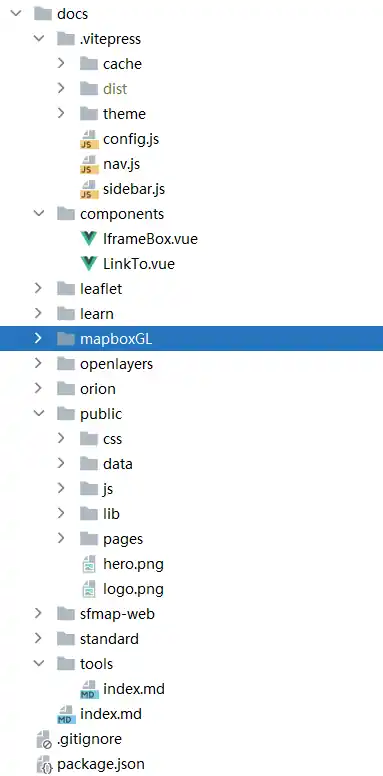
完整目录结构参考如下: