
数据表达
WebGIS中数据的表达大致可分为两种:栅格表达和矢量表达。栅格表达是以图片的形式展示GIS数据,如切片底图、wms服务、静态图片等,该种表达都是在服务端做好图片渲染,根据图片的出图范围再展示到web中; 矢量表达是通过服务或接口返回坐标数据,在通过前端绘图技术(如dom、svg、canvas)将点、线、面数据以图标、文本、点、线、面等方式展示出来。
1. web绘图
前面讲到了“WebGIS中数据的表达”几种方式,本节以canvas 2d为例,分别实现几种方式的实现。
1.1 绘制图片
通过如下代码可实现图片的绘制。
js
function drawImage(img) {
  const image = new Image()
  image.src = img
  image.onload = () => {
    const {width, height} = image
    ctx.drawImage(image, x, y, width, height)
  }
}
1.2 绘制点:
点的绘制有多种方式,常见的有圆点和正方形,实现代码如下。
js
function drawPoint(x, y, size) {
  ctx.strokeStyle = style.strokeColor
  ctx.lineWidth = style.strokeWidth
  ctx.fillStyle = style.fillColor
  // 绘制圆点
  ctx.arc(x, y, size, 0, Math.PI * 2)
  ctx.fill()
  ctx.stroke()
  // 绘制正方形
  x = x - size
  y = y - size
  ctx.fillRect(x, y, size * 2, style.size * 2)
  ctx.strokeRect(x, y, size * 2, style.size * 2)
}
1.3 绘制线
线可分为实线和虚线两种方式,实现代码如下。
js
function drawLine(coords) {
  ctx.beginPath()
  ctx.strokeStyle = style.strokeColor
  ctx.lineWidth = style.strokeWidth
  coords.forEach((coord, index) => {
    const [x, y] = coord
    index === 0 ? ctx.moveTo(x, y) : ctx.lineTo(x, y)
  })
  // 绘制虚线
  if(style.lineDash) ctx.setLineDash(style.lineDash)
  ctx.stroke()
}
1.4 绘制多边形
多边形的绘制分为填充和描边,实现代码如下:
js
function drawpolygon(coords) {
  ctx.beginPath()
  ctx.strokeStyle = style.strokeColor
  ctx.lineWidth = style.strokeWidth
  ctx.fillStyle = style.fillColor
  coords.forEach((coord, index) => {
    const [x, y] = coord
    index === 0 ? ctx.moveTo(x, y) : ctx.lineTo(x, y)
  })
  ctx.closePath()
  ctx.fill()
  // 绘制虚线
  if(style.lineDash) ctx.setLineDash(style.lineDash)
  ctx.stroke()
}
1.5 绘制文本
文本的绘制分为填充和描边两种方式,实现代码如下:
js
function drawText(x, y, text) {
  ctx.beginPath()
  ctx.strokeStyle = style.strokeColor
  ctx.lineWidth = style.strokeWidth
  ctx.fillStyle = style.fillColor
  ctx.textAlign = style.textAlign
  ctx.textBaseline = style.textBaseline
  ctx.font = style.font
  const [x, y] = coords
  ctx.fillText(text, x, y)
  ctx.strokeText(text, x, y)
}
2. WebGIS绘图及原理
前面以canvas为例,说明了WebGIS中涉及到的几种web绘图的方式,WebGIS中的绘图其核心还是web绘图,但是前提是需将地理坐标转换为 屏幕坐标,这就需要用到地图切片及原理的内容。 参考下图,下面的代码展示了如何将地理坐标转换为屏幕坐标的过程。
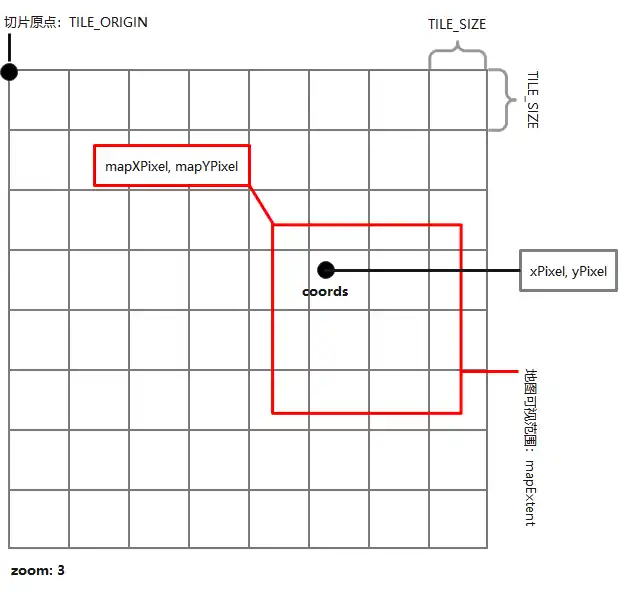
js
const TILE_ORIGIN = 20037508.34
const TILE_SIZE = 256
let resolutions = []
let res = (TILE_ORIGIN  * 2) / TILE_SIZE
for(let i = 0; i < 23; i++) {
  resolutions.push(res)
  res = res / 2
}
/**
 * 地理坐标转换为屏幕坐标
 * @param {Array} coords - 坐标值,需为web墨卡托投影
 * @param {Number} zoom - 地图当前缩放级别
 * @param {Array} mapExtent - 地图的可视范围
 * @return {Array} 屏幕坐标
 */
function coordsToPixel(coords, zoom, mapExtent) {
  const [xmin, ymin, xmax, ymax] = mapExtent
  const [x, y] = coords
  const res = resolutions[zoom]
  const [xOriginMin, yOriginMax] =[-TILE_ORIGIN, TILE_ORIGIN]
  const mapXPixel = (xmin - xOriginMin) / res
  const mapYPixel = (yOriginMax - ymax) / res
  const xPixel = (x - xOriginMin) / res
  const yPixel = (yOriginMax - y) / res
  return [
    xPixel - mapXPixel,
    yPixel - mapYPixel
  ].map(v => Math.round(v))
}